
Students today have access to powerful AI tools that can make studying easier, faster, and more organized. Whether you need help understanding difficult topics, improving your writing, creating presentations, or managing your notes, the right AI tool can save time and increase productivity.
However, with hundreds of AI tools available, choosing the best one can be confusing. Some tools are excellent for research, while others are designed for writing, Design, or learning.
Whether you’re looking for AI writing tools, AI research tools, or the best AI apps for students, this guide will help you choose the right solution for your studies.
What Are AI Tools?
AI tools are software applications that use artificial intelligence to help people complete tasks more efficiently. These tools can generate text, answer questions, summarise information, create images, improve writing, and even help with coding or presentations.
For students, AI tools can save time, improve learning, and make studying more productive. Whether you’re researching a topic, checking grammar, or preparing for an exam, the right AI tool can make your work easier.
Why Students Should Use AI Tools
AI tools have become valuable learning companions for students because they help save time and improve productivity. Instead of spending hours searching for information, students can quickly find explanations, summarise long articles, organize notes, and generate study materials in just a few minutes.
Beyond saving time, AI tools also help students improve their writing, solve problems, prepare presentations, learn programming, and practice new skills. When used responsibly, they support learning rather than replace it, making education more efficient and engaging.
Best Free AI Tools for Students in 2026
There are hundreds of AI tools available today, but not all of them are useful for students. The tools below were selected based on ease of use, free features, reliability, and their ability to help with studying, writing, research, presentations, coding, and productivity.
Claude AI
What is Claude AI?
Claude AI is an advanced artificial intelligence assistant developed by Anthropic. It helps students understand complex topics, answer questions, improve writing, summarise long documents, and generate ideas for assignments. Its clear and natural responses make it a useful learning companion for school, college, and university students.
Best For
- Researching assignments and projects
- Summarizing long articles and notes
- Improving essays and reports
- Brainstorming ideas
- Understanding difficult concepts
Key Features
- Generates clear and detailed answers
- Summarizes long articles and documents
- Helps improve grammar and writing
- Explains complex topics in simple language
- Assists with brainstorming and study planning
- Supports natural conversations for learning
Pros
- Easy to use for beginners
- Excellent writing and summarization
- Clear explanations for complex topics
- Free plan available
- Great for research and studying
Cons
- Daily free usage has limits
- May occasionally provide incorrect information
- An internet connection is required
Pricing
Claude AI has a generous free plan for students. We also offer paid plans for users that require higher usage limits and access to the newest models.
Our Verdict
Claude AI is one of the best free AI tools for students in 2026. It excels at writing, research, summarisation, and learning support, making it an excellent choice for school, college, and university students who want to study more efficiently.

ChatGPT
ChatGPT is one of the most popular AI assistants for students. It can help explain difficult subjects, answer questions, generate ideas, write essays, summarise notes, solve coding problems, and improve productivity. The free version is powerful enough for most everyday study tasks.
What is ChatGPT?
ChatGPT is an AI chatbot developed by OpenAI. Students can use it to ask questions, receive detailed explanations, practice languages, brainstorm ideas, write assignments, and learn new concepts in conversation. It supports many subjects including science, mathematics, programming, history, and English.
Best For
- Understanding difficult subjects
- Homework assistance
- Essay writing and editing
- Programming and coding help
- Brainstorming project ideas
- Language learning
Pros
- Easy to use; fast and detailed answers
- Excellent for learning and research
- Supports many academic subjects
- Free version available
Cons
- Some advanced features require
- ChatGPT Plus:s Information may not always be up-to-date
- Can occasionally make mistakes
Pricing
ChatGPT offers a free plan that is suitable for most students. Users who need higher usage limits and additional features can subscribe to ChatGPT Plus.
Our Verdict
ChatGPT is one of the best AI tools for students because it combines ease of use, powerful explanations, writing assistance, and problem-solving in one platform. It is an excellent choice for school, college, and university students.

Google Gemini
Google Gemini is Google’s AI assistant designed to help students with learning, research, writing, coding, and problem-solving. It integrates with Google services, making it especially useful for students who already use Google Docs, Gmail, Drive, and Search.
What is Google Gemini?
Google Gemini is more than just a chatbot—it’s an AI workspace that helps students think, research, and create. Because it’s connected to Google’s ecosystem, students can move from searching for information to organizing notes, drafting assignments, and exploring complex topics without constantly switching between different apps.
Best For
- Academic research
- Explaining difficult concepts
- Brainstorming project ideas
- Writing reports and presentations
- Working with Google Workspace
- Learning new skills
Key Features
- Research topics with AI-powered explanations
- Create presentations and outlines
- Generate essays and reports
- Summarize PDFs and long articles
- Solve math and programming problems
- Generate images with AI (supported features)
- Create and improve emails
- Brainstorm project ideas
- Translate multiple languages
- Integrates with Google Docs, Gmail, and Drive
- Supports voice conversations (where available)
- Helps create study notes and revision material
Pros
- Excellent integration with Google’s ecosystem
- Fast responses for everyday learning
- Helpful for both research and creativity
- Clean and beginner-friendly interface
- Free plan available
Cons
- Some advanced AI models require a subscription
- Responses should still be fact-checked
- The best experience requires a Google account
Pricing
Google Gemini includes a free plan suitable for most students. Premium features and access to more advanced models are available through Google’s paid subscription options.
Our Verdict
If you already rely on Google products for school or university, Gemini fits naturally into your workflow. Its combination of research, writing, and productivity features makes it one of the strongest AI assistants for students looking to study more efficiently.

Perplexity AI
What is Perplexity AI?
Perplexity AI is an AI-powered search assistant that combines conversational answers with real-time web information. Unlike traditional search engines, it provides direct answers while citing sources, making it easier for students to verify information and continue their research.
Best For
- Academic research
- Finding reliable sources
- Fact-checking information
- Summarizing web articles
- Learning new topics
- Research projects
Key Features
- Searches the web in real time
- Shows sources and references
- Summarizes long articles
- Answers complex research questions
- Generates follow-up questions
- Supports document uploads
- Helps compare different sources
- Free version available
Pros
- Provides source citations
- Fast and accurate research
- Beginner-friendly interface
- Great for academic work
- Free plan available
Cons
- Advanced features require a paid plan
- Response quality depends on available sources
- Still requires users to verify important information
Pricing
Perplexity AI offers a free plan with useful research features. A Pro subscription unlocks more advanced AI models, higher usage limits, and additional capabilities.
Our Verdict
If your assignments require reliable information and trustworthy references, Perplexity AI is one of the best research assistants available. Its combination of AI-generated answers and source citations makes it an excellent choice for students who want to study smarter and verify what they learn.
Grammarly
What is Grammarly?
Grammarly is an AI-powered writing assistant that helps students improve grammar, spelling, punctuation, clarity, and writing style. Whether you’re writing essays, emails, or research papers, Grammarly provides real-time suggestions to make your writing more professional and easier to read.
Best For
- Essay writing
- Grammar checking
- Proofreading assignments
- Email writing
- Research papers
- Improving English writing skills
Key Features
- Corrects grammar and spelling mistakes
- Improves sentence clarity
- Suggests better vocabulary
- Detects punctuation errors
- Rewrites sentences for better readability
- Checks tone and writing style
- Browser extension for multiple websites
- Works with Microsoft Word and Google Docs
Pros
- Easy to use
- Real-time writing suggestions
- Helps improve English skills
- Free version available
- Works across many platforms
Cons
- Advanced writing suggestions require
- Premium; not always perfect for technical writing
- Requires an internet connection for most features
Pricing
Grammarly offers a free version with essential writing corrections. Premium plans unlock advanced grammar, style, plagiarism detection, and AI writing features.
Our Verdict
Grammarly is one of the most useful AI tools for students who want to improve their writing. From essays to emails, it helps produce clearer, more professional work while reducing grammar and spelling mistakes.

Grok AI
What is Grok AI?
Grok AI is an artificial intelligence assistant developed by xAI. It helps users answer questions, generate content, brainstorm ideas, explain complex topics, and assist with coding and research. Its conversational style makes it useful for students looking for quick explanations and creative problem-solving.
Best For
- Research and learning
- Homework assistance
- Brainstorming ideas
- Coding support
- Explaining difficult concepts
- Creative writing
Key Features
- Answers questions in natural language
- Explains complex topics clearly
- Assists with coding and debugging
- Generates summaries and study notes
- Helps create emails and reports
- Brainstorms project ideas
- Supports creative writing
- Provides up-to-date information on many topics
Pros
- Easy-to-understand responses
- Helpful for learning and research
- Fast answers
- Supports many subjects
- Good for creative thinking
Cons
- Some features require a paid subscription
- AI responses should always be verified
- Availability may vary by platform or region
Pricing
Grok offers limited free access for some users, while additional features and higher usage limits are available through paid subscription plans.
Our Verdict
Grok AI is a strong option for students who want an AI assistant for research, learning, and idea generation. It is especially useful for brainstorming and understanding complex topics, but students should always verify important information with reliable sources.

Canva AI
What is Canva AI?
Canva AI is an AI-powered design assistant that helps students create professional presentations, posters, resumes, infographics, social media graphics, and short videos with minimal design experience. Its AI features simplify the creative process, allowing users to generate designs, edit images, and produce visual content quickly.
Best For
- Creating presentations
- Designing resumes
- Making posters and infographics
- Editing photos with AI
- Creating social media graphics
- Generating short videos
- Team collaboration on projects
Key Features
- AI-powered presentation creation
- Magic Design for instant templates
- AI image generation
- AI photo editing and background removal
- Magic Write for content generation
- Video editing tools
- Thousands of customizable templates
- Cloud-based collaboration
Pros
- Beginner-friendly interface
- Free plan available
- High-quality templates
- AI-powered design tools
- Great for school and university projects
- Supports image and video editing
Cons
- Some premium templates require a Pro subscription
- Advanced AI features have usage limits
- Internet connection required
Pricing
Canva offers a generous free plan with many templates and AI features. Students who need premium templates, advanced AI tools, and additional storage can upgrade to Canva Pro.
Our Verdict
Canva AI is one of the best creative tools for students. Whether you’re preparing a class presentation, designing a resume, editing photos, or creating short videos, it combines powerful AI features with an easy-to-use interface, making it an excellent choice for academic and creative projects.

Notion AI
What is Notion AI?
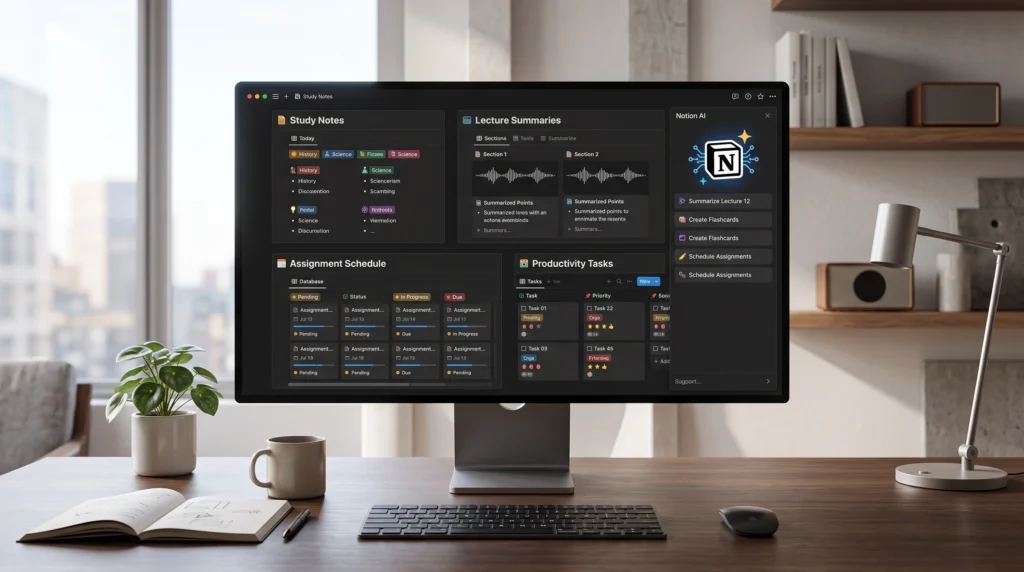
Notion AI is an intelligent productivity assistant built into Notion. It helps students organize notes, summarise lectures, create study plans, generate content, and manage assignments in one workspace. By combining AI with note-taking and task management, it makes studying more organized and efficient.
Best For
- Organizing study notes
- Creating revision plans
- Managing assignments
- Summarizing lecture notes
- Writing essays and reports
- Team collaboration
Key Features
- AI-powered note summarization
- Generates study guides and outlines
- Creates task lists and schedules
- Brainstorms ideas for projects
- Rewrites and improves writing
- Supports collaborative workspaces
- Organizes documents in one place
- Works across desktop and mobile devices
Pros
- Keeps all study materials organized
- Excellent for productivity
- Easy collaboration with classmates
- Saves time when managing assignments
- Clean and distraction-free interface
Cons
- AI features require a paid plan
- Takes time to learn all features
- Works best with an internet connection
Pricing
Notion offers a free plan with powerful note-taking features. AI capabilities are available through paid plans for users who want advanced writing and productivity tools.
Our Verdict
Notion AI is one of the best productivity tools for students who want to keep their notes, assignments, and projects organized. Its AI features make planning, writing, and studying more efficient, making it a valuable companion throughout the academic year.
Gamma AI
What is Gamma AI?
Gamma AI is an AI-powered presentation and document creation platform that helps students turn ideas into professional slides, reports, and web pages within minutes. Instead of designing each slide manually, Gamma AI automatically generates attractive layouts, making it ideal for school and university projects.
Best For
- Creating presentations
- School and university projects
- Business reports
- Visual storytelling
- Team collaboration
- Pitch decks
Key Features
- Creates presentations from a simple prompt
- AI-generated slide designs
- Professional themes and layouts
- Adds images and icons automatically
- Easy editing and customization
- Supports sharing through a link
- Exports presentations to PDF and PowerPoint
- Works on desktop and mobile browsers
Pros
- Saves hours of presentation
- Beautiful modern designs
- Beginner-friendly
- Fast AI generation
- Free plan available
Cons
- Some premium templates require a paid plan
- Internet connection required
- Advanced customization is more limited than traditional presentation software.
Pricing
Gamma AI offers a free plan for creating presentations with basic features. Paid plans provide additional AI credits, advanced customization, and premium templates.
Our Verdict
Gamma AI is an excellent choice for students who want to create professional presentations without spending hours designing slides. Its AI-powered workflow makes it one of the fastest presentation tools available.
GitHub Copilot
What is GitHub Copilot?
GitHub Copilot is an AI coding assistant developed by GitHub in collaboration with OpenAI. It helps students write code faster, understand programming concepts, debug errors, and learn new programming languages by providing real-time code suggestions inside popular code editors.
Best For
- Learning programming
- Writing code faster
- Debugging code
- Completing coding assignments
- Understanding new programming languages
- Software development projects
Key Features
- AI-powered code completion
- Explains programming concepts
- Suggests functions and algorithms
- Helps identify and fix coding errors
- Supports many programming languages
- Integrates with Visual Studio Code and GitHub
- Generates comments and documentation
- Improves coding productivity
Pros
- Saves time while coding
- Helps beginners learn programming
- Supports many languages
- Improves coding productivity
- Easy integration with popular code editors
Cons
- Best features require a paid subscription
- AI-generated code should always be reviewed
- Requires an internet connection
Pricing
GitHub Copilot offers paid plans, and eligible students may receive access through GitHub Education benefits. Check GitHub’s official website for the latest eligibility and Pricing details.
Our Verdict
GitHub Copilot is one of the best AI tools for programming students. It speeds up coding, helps explain difficult concepts, and makes software development more efficient. While it should not replace learning the fundamentals, it is an excellent assistant for practice and real-world projects.

The comparison below highlights the best AI tools for students based on their features, Pricing, ease of use, and ideal use cases.
| AI Tool | Best For | Free Plan | Difficulty | Overall Rating |
|---|---|---|---|---|
| Claude AI | Writing & Research | ✅ Yes | Easy | ⭐ 9.5/10 |
| ChatGPT | Homework & Learning | ✅ Yes | Easy | ⭐ 9.8/10 |
| Google Gemini | Research & Google Workspace | ✅ Yes | Easy | ⭐ 9.4/10 |
| Perplexity AI | Research & Fact Checking | ✅ Yes | Easy | ⭐ 9.3/10 |
| Grammarly | Grammar & Writing | ✅ Yes | Easy | ⭐ 9.2/10 |
| Grok AI | Brainstorming & Learning | ✅ Yes | Easy | ⭐ 9.0/10 |
| Canva AI | Design & Presentations | ✅ Yes | Easy | ⭐ 9.4/10 |
| Notion AI | Notes & Productivity | ⚠️ Limited | Medium | ⭐ 9.1/10 |
| Gamma AI | AI Presentations | ✅ Yes | Easy | ⭐ 9.2/10 |
| GitHub Copilot | Coding & Programming | ⚠️ Limited | Medium | ⭐ 9.3/10 |
Every AI tool has its own strengths. ChatGPT is an excellent all-around assistant; Perplexity AI is ideal for research; Canva AI and Gamma AI help create professional presentations, while GitHub Copilot is designed for programming students. Instead of relying on a single tool, combining multiple AI assistants can help students complete tasks more efficiently and improve their learning experience.
Different AI study tools are designed for different purposes. Some focus on writing, others on research, presentations, or coding.
Which AI Tool Should You Choose?
With so many AI tools available, choosing the right one depends on your goals. Some tools are designed for writing and research, while others focus on Design, presentations, coding, or productivity. Instead of using a single AI assistant for everything, students can achieve better results by selecting the right tool for each task.
Best AI Tool for Different Needs
- 📝 Best for Essay Writing: Claude AI
- 🤖 Best Overall AI Assistant: ChatGPT
- 🔍 Best for Research: Perplexity AI
- 🌐 Best for Google Users: Google Gemini
- ✍️ Best for Grammar & Proofreading: Grammarly
- 💡 Best for Brainstorming: Grok AI
- 🎨 Best for Graphic Design: Canva AI
- 📒 Best for Notes & Productivity: Notion AI
- 📊 Best for Presentations: Gamma AI
- 💻 Best for Programming: GitHub Copilot
💡 Pro Tip
AI tools work best when used responsibly. Always review AI-generated content, verify important facts from trusted sources, and use AI to support your learning rather than replace your own thinking.
Frequently Asked Questions About AI Tools for Students
What is the best free AI tool for students in 2026?
Answer:
ChatGPT is one of the best free AI tools for students because it helps with writing, research, coding, brainstorming, and learning. Other excellent options include Google Gemini, Claude AI, Perplexity AI, and Canva AI.
Which AI tool is best for writing assignments?
Answer:
Claude AI and ChatGPT are excellent for writing essays, reports, and assignments. Grammarly can then help improve grammar, spelling, and readability before submission.
Which AI tool is best for academic research?
Answer:
Perplexity AI is one of the best AI research tools because it provides answers with source citations, making it easier to verify information for assignments and projects.
Is ChatGPT free for students?
Answer:
Yes. ChatGPT offers a free version that is suitable for many student tasks, including homework help, brainstorming, writing, and learning new concepts. Paid plans provide access to additional features and more advanced models.
Can AI tools help with homework?
Answer:
Yes. AI tools can explain difficult topics, summarise notes, solve practice problems, and organize study materials. They should be used to support learning rather than replace your own understanding. Which AI tool is best for presentations?
Which AI tool is best for presentations?
Answer:
Gamma AI and Canva AI are among the best AI presentation tools. They can quickly create professional slides, templates, and visual content for school and university projects.
Which AI tool is best for programming students?
Answer:
GitHub Copilot is one of the best AI coding assistants. It helps students write code faster, understand programming concepts, and debug errors in supported code editors.
Can AI improve grammar and writing?
Answer:
Yes. Grammarly uses AI to correct grammar, spelling, punctuation, and writing style. It also suggests improvements to make essays and reports clearer and more professional.
Which AI tool works best with Google Docs?
Answer:
Google Gemini integrates with Google Docs, Gmail, Drive, and other Google Workspace apps, making it an excellent choice for students who already use Google’s ecosystem.
Are AI tools safe for students?
Answer:
Yes, AI tools are generally safe when used responsibly. Students should avoid sharing sensitive personal information and always verify important facts using trusted sources.
Can AI tools summarise PDFs and lecture notes?
Answer:
Yes. Google Gemini, Claude AI, ChatGPT, and Notion AI can help summarise PDFs, lecture notes, and long documents, making revision more efficient.
Which AI tool is best for taking notes?
Answer:
Notion AI is one of the best tools for organizing notes, creating study plans, managing assignments, and summarising lecture content in one workspace.
Can AI tools create images and graphics?
Answer:
Yes. Canva AI includes AI-powered design features that help students create posters, presentations, resumes, social media graphics, and other visual content with minimal design experience.
Do students need to pay for AI tools?
Answer:
Many AI tools offer free plans with enough features for everyday study. Premium subscriptions are optional and mainly provide higher usage limits or additional advanced capabilities.
Do students need to pay for AI tools?
Answer:
Many AI tools offer free plans with enough features for everyday study. Premium subscriptions are optional and mainly provide higher usage limits or additional advanced capabilities.
Conclusion
Artificial intelligence has become an essential learning companion for students in 2026. Whether you need help writing essays, researching topics, designing presentations, improving grammar, or learning to code, there is an AI tool that can make your work easier and more efficient.
By combining different free AI tools, students can improve productivity, complete assignments faster, and develop new skills more efficiently.
In this guide, we’ve explored some of the best free AI tools for students, each with its own strengths and use cases. Instead of relying on a single tool, consider combining multiple AI assistants to boost productivity, improve your learning experience, and save valuable time.
Remember that AI should support your education—not replace critical thinking or independent learning. Always verify important information, use trusted sources, and apply your own knowledge when completing assignments.
As AI technology continues to evolve, staying updated with new tools and features will help you study smarter and prepare for the future. Choose the tools that match your goals, experiment with them responsibly, and make them part of your daily learning routine.
About the Author
Umama Saleem is the founder of Corzelan, where she shares AI tool reviews, helpful guides, and technology tips. Her goal is to help students, professionals, and creators discover the best AI tools to improve learning and productivity.
Continue Exploring AI
Looking for more AI tools and technology guides? Visit Corzelan regularly for the latest AI reviews, tutorials, productivity tips, and free resources to help you work smarter, study better, and stay updated with the world of artificial intelligence.