Introduction
What Are AI Agents?
AI agents are becoming one of the biggest developments in artificial intelligence, but the idea is actually quite simple.
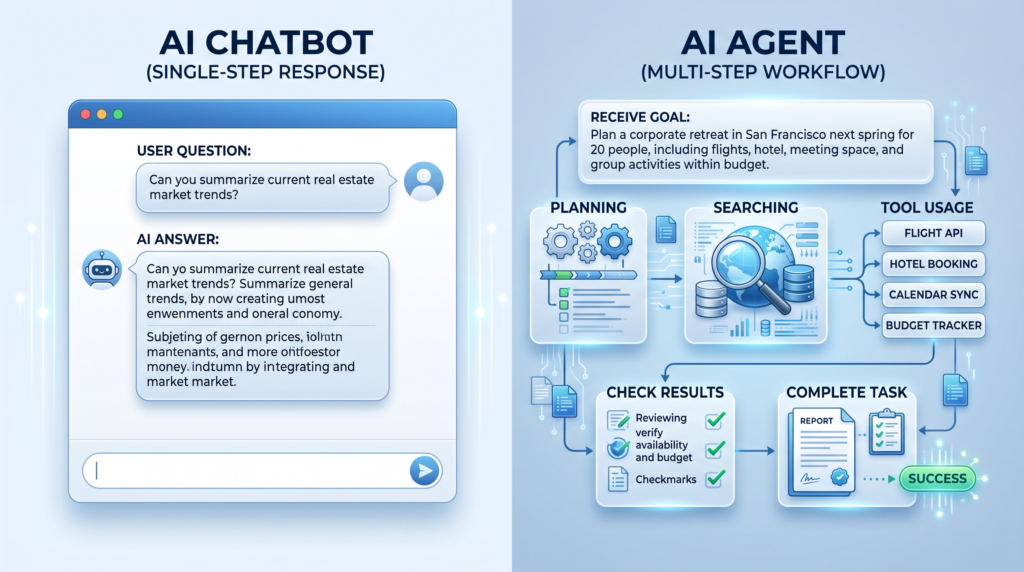
An AI chatbot usually waits for you to ask a question and then gives you an answer. An AI agent can go a step further: you give it a goal, and it can plan steps, use available tools, check results, and take actions to work toward that goal.
For example, instead of asking AI to “find some AI tools”, you could give an agent a larger task such as finding suitable tools, collecting information, comparing the options, and organising the results. What the agent can actually do depends on the tools, permissions, and system it has access to.
In this guide, we’ll explain AI agents in simple language, show how they work, compare them with normal chatbots, look at real examples, and explain what beginners should know before using them.
In Simple Words
A chatbot mainly gives you answers.
An AI agent is designed to work toward a goal by taking multiple steps and using the tools available to it.
AI Agents vs Chatbots: What’s the Difference?
If you have used ChatGPT or another AI chatbot, you may wonder why people are suddenly talking about AI agents.
The easiest way to understand the difference is this:
A chatbot mainly talks with you and gives you information.
An AI agent is designed to work toward a goal by taking multiple steps and using the tools it has access to.
For example, imagine you ask an AI:
“Find three good laptops for students and compare their prices.”
A chatbot might give you a list based on the information available to it.
An AI agent could potentially search for products, collect information, compare the options, organise the results, and prepare a report. The exact actions depend on the agent and the tools or permissions it has.
This doesn’t mean AI agents are always better. A simple question may only need a chatbot. An agent becomes more useful when a task requires several steps or actions.
📊 Simple comparison
| Feature | AI Chatbot | AI Agent |
|---|---|---|
| Answers questions | ✅ | ✅ |
| Holds a conversation | ✅ | ✅ |
| Works toward a larger goal | Limited | ✅ |
| Uses external tools | Sometimes | Often |
| Takes actions | Usually limited | ✅ |
| Handles multi-step tasks | Limited | ✅ |
| Needs human review | Often | Still recommended |
⭐ In Simple Words
Chatbot = “Tell me how to do it.”
AI agent = “Here’s the goal. Work through the steps and help me get it done.”

How Do AI Agents Work?
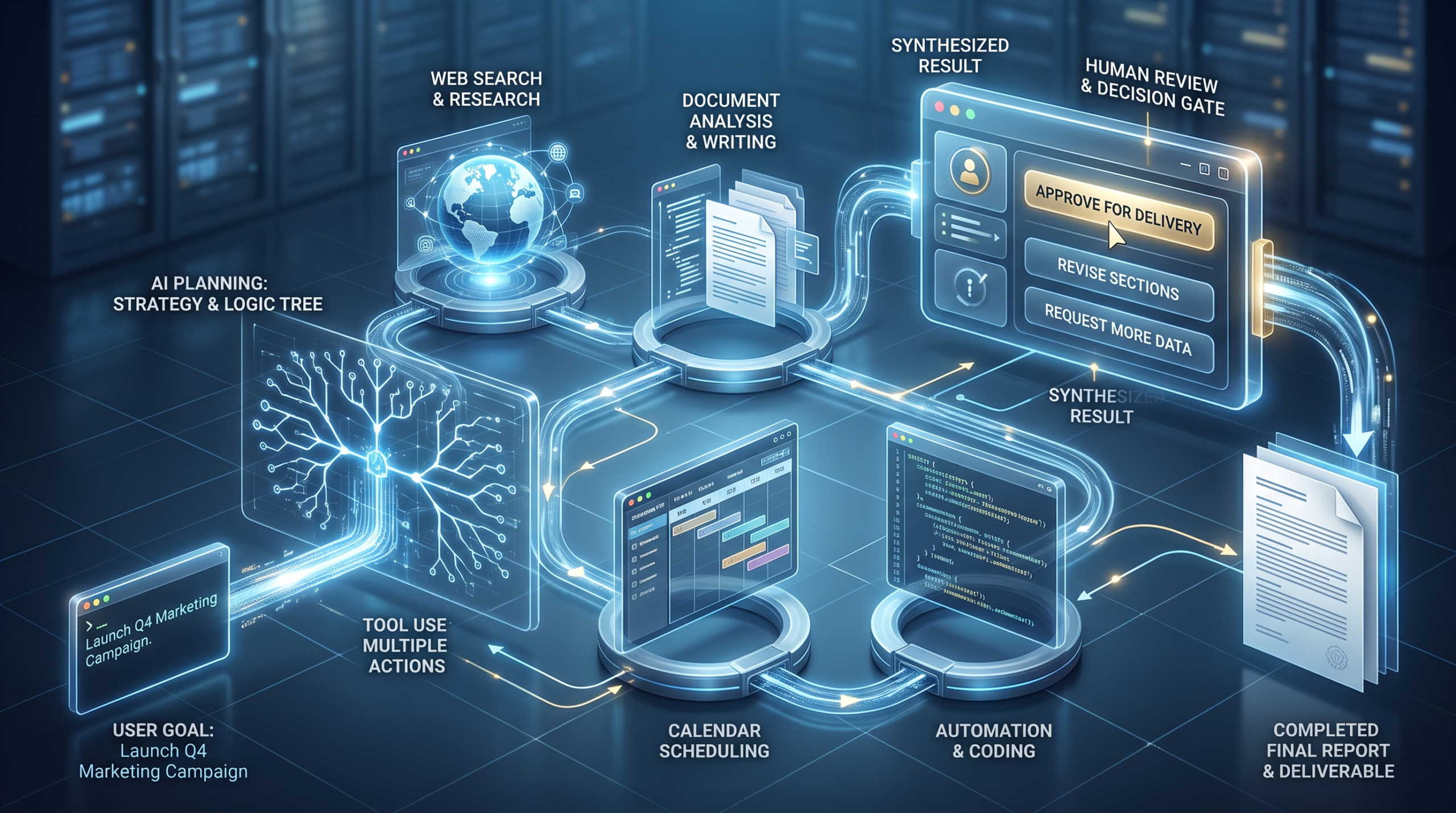
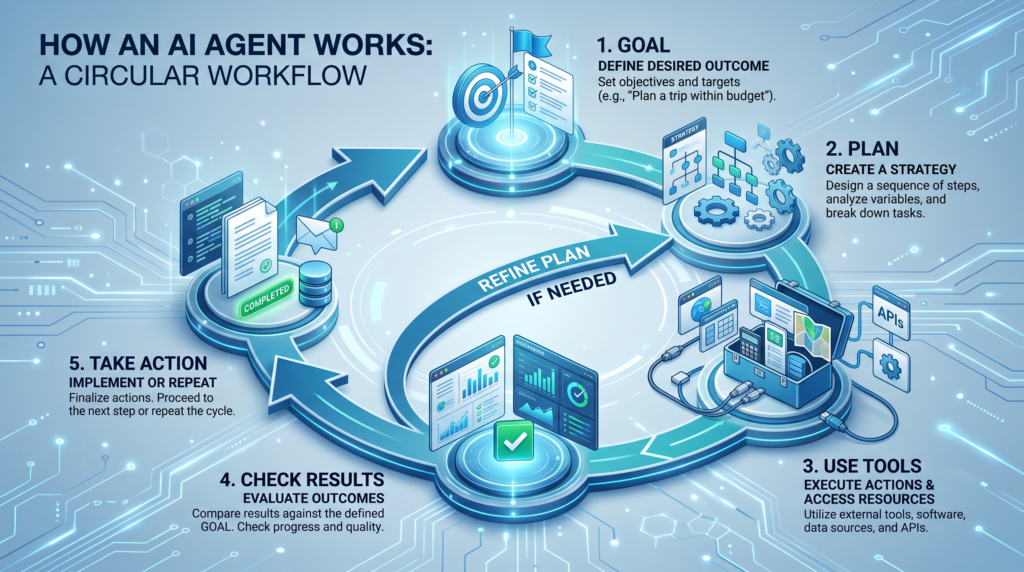
AI agents usually work through a simple cycle: they receive a goal, understand what needs to be done, plan the next steps, use available tools, check the results, and continue until the task is completed or they need help from a person.
The exact design can be different from one AI agent to another, but most modern agents rely on a combination of reasoning, planning, memory, tools, and actions.
You Give the Agent a Goal
First, you tell the AI what you want to accomplish.
For example:
“Research the best free AI tools for students and create a comparison.”
The agent now has an outcome to work toward instead of just answering one question.
The agent plans the steps.
The agent can break the larger goal into smaller steps.
For example:
- Find relevant AI tools.
- Collect information about each tool.
- Compare their features.
- Check important details.
- Organise the results.
- Create the final comparison.
This planning ability is one reason agents are useful for tasks that would normally require several separate prompts.
The Agent Uses Tools
An AI model by itself mainly generates information. An agent can also be connected to tools that allow it to do things outside the conversation.
Depending on the system, these tools might include the following:
- Web search
- Websites
- Databases
- Calendars
- Files
- Code execution
- Business software
The available tools determine what the agent can actually do.
It checks what happened.
After taking an action, the agent can look at the result and decide what to do next.
For example, if a search does not provide enough information, the agent may try another search. If a task produces an error, it may adjust its approach or ask for help.
This creates a loop instead of a single question-and-answer exchange.
Memory Can Help
Some AI agents can store or retrieve information from previous interactions. This can help an agent maintain context when working on longer tasks.
However, memory is not perfect. Important information should still be checked, especially when an agent is working with sensitive or important data.
⭐ In Simple Words
Goal → Plan → Use Tools → Check Result → Continue → Finish
A Simple Real-Life Example of an AI Agent
Imagine you run a small online business and receive dozens of customer emails every day.
A normal chatbot could answer a customer’s question when you ask it to.
An AI agent could be given a larger goal, such as the following:
“Help manage incoming customer requests.”
Depending on its setup and permissions, the agent could:
- Read a new customer request.
- Understand what the customer needs.
- Check information from connected systems.
- Decide which type of request it is.
- Prepare a response.
- Create or update a support ticket.
- Send the request to a human when the situation needs personal attention.
The important part is that the agent can work through several connected steps instead of waiting for you to give it a new instruction after every step.
Real-world AI-agent systems are increasingly being used for workflows such as customer support, coding, research, and business operations.
Another Simple Example: Research
You could give an AI agent a goal such as the following:
“Research the best AI website builders for beginners and prepare a comparison.”
Instead of only answering immediately, an agent could potentially:
- Search for relevant information.
- Collect information from different sources.
- Compare features.
- Organise the findings.
- Create a report.
Exactly what it can do depends on the agent’s tools, permissions, and instructions.
⭐ In Simple Words
A chatbot helps you with a conversation.
An AI agent can help you complete a workflow.
What Can AI Agents Actually Do?
AI agents can be used for many different types of work. This can include turning meeting recordings into organised notes and summaries. Their abilities depend on the tools, permissions, and information connected to them.
Here are some practical examples of what AI agents can do:
Research
A research agent can help gather information from multiple sources, organise findings, and create a report.
For example, you could give it a goal such as the following:
“Research the latest AI website-building tools and create a comparison.”
The agent may search for information, organise the results, and prepare a structured report.
Coding
Coding agents can help developers work on software projects. Depending on their tools, they can inspect code, find problems, make changes, run tests, and help prepare a solution.
This is one of the areas where agentic AI has become especially active in 2026. :contentReference[oaicite:1]{index=1}
Customer Support
A customer-support agent can help handle incoming requests.
It may understand a customer’s question, look up relevant information, prepare a response, and send complicated cases to a human.
Business Tasks
AI agents can help with repetitive business workflows such as organising information, updating systems, preparing reports, or moving information between connected tools.
For example, an agent could receive a new request, check company information, prepare the required document, and send it to the correct person for approval.
Sales and Marketing
Some agents can help research potential customers, organise leads, prepare personalised messages, or analyse marketing information.
The agent should still operate within clear rules and permissions, especially when communicating with real customers.
Data Analysis
An AI agent can work with data and, when connected to the right tools, help analyse information, create calculations, find patterns, and prepare charts or reports.
Personal Productivity
Agents can also help with everyday work such as organising information, managing tasks, preparing documents, and handling repeatable workflows.
The important idea is that an agent is not useful simply because it is “autonomous”. It is useful when it can reliably complete a specific task using the right tools.
⭐ Simple Example
Traditional AI:
You ask → AI answers → Done
AI Agent:
You give a goal → Agent plans → Uses tools → Checks results → Continues → Completes the task
AI Agents vs AI Assistants vs Chatbots
These three terms can sound almost the same, but they are not always used in the same way.
The easiest way to understand them is to look at how much work the AI can do on its own.
A chatbot mainly focuses on conversation. An AI assistant helps a person complete tasks. An AI agent is designed to work toward a goal by planning and taking multiple actions.
The boundaries are not perfect. Some modern AI products can behave like both assistants and agents depending on their features, tools, and permissions. So instead of trusting the label, look at what the system can actually do.
📊 Simple Comparison
| Feature | Chatbot | AI Assistant | AI Agent |
|---|---|---|---|
| Main purpose | Conversation | Help a person | Complete a goal |
| Answers questions | ✅ | ✅ | ✅ |
| Helps with tasks | Limited | ✅ | ✅ |
| Plans multiple steps | Usually limited | Sometimes | ✅ |
| Uses tools | Sometimes | Often | Often |
| Takes actions | Limited | With user direction | Can take multiple actions |
| Autonomy | Low | Low–medium | Higher |
| Best for | Questions & basic support | Productivity | Complex workflows |
🧠 Easy Example
Chatbot:
“What is the weather today?”
→ Gives you an answer.
AI Assistant:
“Remind me to study at 7 PM.”
→ Helps you complete the task.
AI Agent:
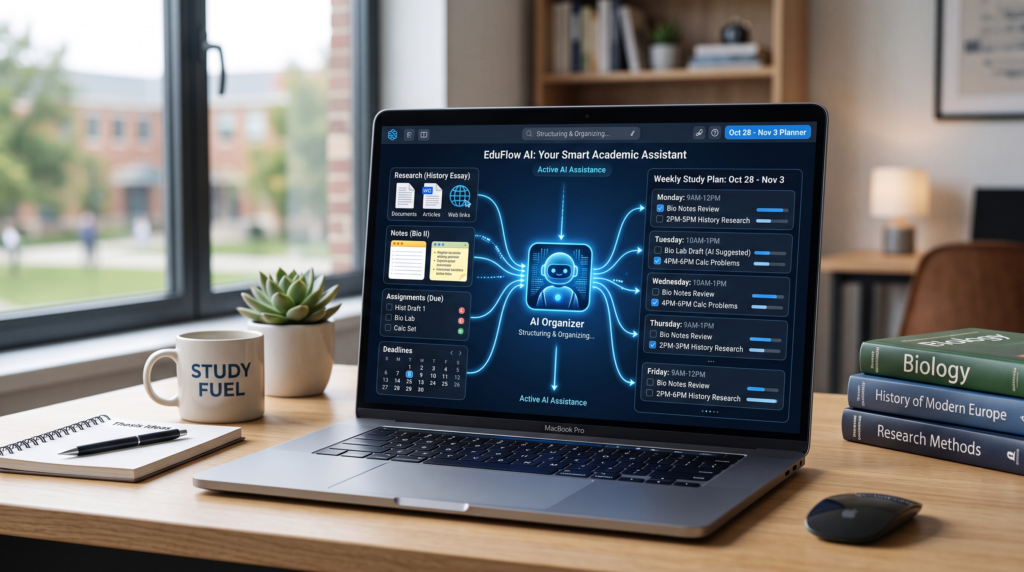
“Organise my study plan for next week.”
→ Could break the goal into steps, use connected tools, create a schedule, and adjust the plan depending on its available capabilities and permissions.
⭐ Remember This
Chatbot = Talks
AI Assistant = Helps
AI Agent = Works towards a goal
Real AI Agent Examples You Can Use in 2026
AI agents are no longer just a future idea. They are already being used for research, coding, customer support, productivity, and other multi-step tasks.
However, not every AI tool called an “agent” works in the same way. Some can take actions automatically, while others still require your approval before doing important things.
Here are some examples that help show what AI agents can look like in real life.
ChatGPT Agent
ChatGPT Agent is designed to handle multi-step tasks using tools such as web browsing and computer interaction.
For example, an agent can work through a research task or interact with websites instead of simply giving you a written answer.
This makes it a useful example of how AI is moving from answering questions toward completing tasks.
Gemini Deep Research
Gemini Deep Research is an example of an AI system designed for longer research tasks.
Instead of asking one question and receiving a short answer, you can give it a research goal and let it gather and organise information into a more detailed report.
Coding Agents
Coding agents are another major example.
Instead of asking AI to explain one piece of code, a coding agent can work through a larger software task. Depending on its tools, it may inspect a project, modify code, run tests, identify problems, and continue working on the task.
This is one reason agentic AI is becoming important beyond traditional chatbot use.
AI Agents for Business Workflows
Businesses are also experimenting with agents for workflows such as research, finance, customer support, sales, and operations.
For example, an agent could receive a request, gather information from connected systems, prepare a result, and send the work to a person for approval.
The goal is not simply to have AI write something. The goal is to reduce the number of manual steps needed to complete a workflow.
Personal Productivity Agents
AI agents can also be useful for personal productivity.
Depending on the system and permissions, an agent might help organise emails, manage tasks, work with documents, plan activities, or create a schedule.
For example, instead of asking AI to summarise your tasks, you could give it a goal such as the following:
“Review my tasks for this week and create a realistic plan.”
The agent could then organise the information and produce a plan using the tools available to it.
⭐ Simple takeaway
AI agents are useful when a task has multiple steps.
The more tools and permissions an agent has, the more it may be able to do.
But more autonomy also means you should give the agent only the access it actually needs and review important results.
How Can Beginners Use AI Agents?
If you are new to AI agents, you do not need to start with complicated automation or business systems. The easiest approach is to begin with a small task that has a clear goal and a few simple steps. You can also explore AI tools for beginners before choosing an agent.
For example, instead of asking AI one question at a time, give it a complete task and explain what the final result should look like.
Here are some beginner-friendly ways to experiment with AI agents.
Research a Topic
Give the agent a topic and ask it to research the subject, compare reliable sources, and organise the information into a report.
Example:
“Research the basics of AI agents for a beginner. Organise the information into definitions, examples, benefits, risks, and useful resources.”
Plan Your Week
If your agent has access to your tasks or calendar, you can give it a goal such as the following:
“Help me organise my week. Prioritise my important tasks and create a realistic schedule.”
Review the suggested schedule before allowing the agent to make changes to your calendar.
Organize Your Notes
You can give an AI system a collection of notes and ask it to organise them by topic, identify important information, and create a simple summary.
This can be useful for students, researchers, and people who work with large amounts of information.
Help With Repetitive Work
AI agents can be useful for repetitive tasks that follow a predictable process.
For example, an agent might help organise incoming information, prepare a report, classify requests, or move information between connected tools.
Start with a low-risk task before giving an agent access to important systems.
Try a Small Workflow
The best way to understand agents is to try a small workflow yourself.
Choose a task that:
- Has a clear goal.
- Has several simple steps.
- Does not involve sensitive information.
- Can be checked easily.
- Does not require the agent to make an important decision on your behalf.
Once you understand how the workflow works, you can gradually experiment with more advanced tasks.
⭐ Beginner Prompt
I want you to help me complete this goal: [write your goal].
First, break the goal into clear steps.
For each step, explain what you need to do and what information or tools you need.
Do not take any important action without asking for my approval.
At the end, give me a summary of what was completed and what still needs to be done.
⚠️ Safety Tip
When experimenting with AI agents, give them the minimum access they need. Do not give an unfamiliar agent unnecessary access to private files, accounts, emails, payments, or other sensitive information.
For important actions, keep human approval enabled whenever possible.
Benefits and Limitations of AI Agents
AI agents can make certain tasks faster and easier, but they are not perfect. The same ability that allows an agent to complete multiple steps can also create problems if the agent misunderstands the goal or has too much access.
Understanding both the benefits and limitations is important before using an AI agent for real work.
Benefits of AI Agents
AI agents can offer several useful advantages:
- Save time: They can handle repetitive, multi-step tasks.
- Reduce manual work: An agent can connect several steps into one workflow.
- Work with tools: Depending on the system, agents can use websites, files, databases, calendars, or business software.
- Handle longer tasks: They can continue through several steps instead of requiring a new prompt after every action.
- Improve productivity: They can help people focus on decisions and creative work instead of repetitive processes.
- Work continuously: Some systems can monitor tasks or workflows without requiring someone to start every step manually.
Limitations of AI Agents
AI agents also have important limitations:
- They can make mistakes: An agent may misunderstand information or produce an incorrect result.
- They can follow the wrong instructions: A vague goal can lead to an unwanted outcome.
- They need the right tools: An agent cannot perform an action if it does not have access to the required system or information.
- They can be unpredictable: Multi-step tasks can sometimes produce unexpected results.
- They can create security risks: Giving an agent access to accounts, files, or other systems increases the potential impact of mistakes or misuse.
- They still need human oversight: Important decisions and high-risk actions should not be trusted blindly to an AI agent.
📊 Quick Comparison
| Benefits | Limitations |
|---|---|
| Saves time | Can make mistakes |
| Automates repetitive work | Needs appropriate tools |
| Handles multiple steps | May misunderstand goals |
| Can use connected systems | Can create security risks |
| Improves productivity | Human review may still be needed |
⭐ Corzelan Tip
The goal should not be to give an AI agent control over everything.
The better approach is to give it a clear task, the minimum access it needs, and human approval for important actions.

How Can Students and Everyday Users Use AI Agents?
AI agents are not only useful for large companies or software developers. As these tools become easier to use, beginners can also use them for everyday tasks.
The key is to choose tasks where an agent can save time without giving it unnecessary access to private or sensitive information.
Research and Learning
A student can give an AI agent a research goal and ask it to organise information into topics, create a study outline, or compare different sources.
For example:
“Research the basics of cybersecurity and create a beginner-friendly study guide with key terms, examples, and questions for revision.”
The student should still check important facts and sources instead of treating the AI output as automatically correct.
Study Planning
An AI agent can help turn a list of subjects, assignments, and deadlines into a study plan.
For example:
“I have three exams next week and two assignments. Organise my available study time and create a realistic plan.”
If the agent is connected to a calendar, review the plan before allowing it to make changes.
Organizing Notes
Students can use AI to organise large collections of notes into topics, summaries, questions, or revision points.
Instead of manually sorting every note, you can give the AI a clear goal and ask it to create a consistent structure.
Personal Productivity
AI agents can also help with everyday organisation.
Depending on the tools available, an agent may help organise tasks, prepare documents, manage information, or create a schedule.
For simple tasks, a normal chatbot may be enough. An agent becomes more useful when the task involves several connected steps.
⭐ Simple Rule for Beginners
Use a chatbot when you need an answer.
Use an AI assistant when you need help with a task.
Consider an AI agent when you have a goal that requires several steps.
⚠️ Remember
AI agents should support your work, not replace your judgement.
For schoolwork, research, or important decisions, check the information yourself and follow your institution’s rules about AI use.
How to Choose the Right AI Agent
Not every AI agent is designed for the same job. Some are built for research, some for coding, some for business workflows, and others for personal productivity.
Before choosing an AI agent, focus on what you actually need it to do rather than choosing a tool simply because it is popular.
Start With Your Goal
Ask yourself:
“What exactly do I want the AI agent to accomplish?”
For example:
- Research information
- Organize documents
- Help with coding
- Manage repetitive tasks
- Create reports
- Handle customer requests
- Organize personal tasks
A clear goal makes it easier to choose the right type of agent.
Check Which Tools It Can Use
An agent’s abilities depend heavily on the tools it can access.
Check whether it can work with the services you actually use, such as:
- Web browsers
- Documents
- Spreadsheets
- Calendars
- Databases
- Coding environments
- Business applications
Don’t choose an agent based only on its AI model. The connected tools can be just as important.
Check Permissions
Before giving an AI agent access to an account or service, understand what permissions it requires.
If an agent only needs to read information, there may be no reason to give it permission to delete, purchase, send, or modify information.
The safest approach is to give an agent only the access it needs for the task.
Look at Human Approval Options
For important actions, look for systems that allow you to review or approve an action before it happens.
For example, an agent could prepare an email without sending it or prepare a calendar change without applying it immediately.
This gives you more control while still allowing the AI to handle much of the preparation work.
Consider Privacy and Security
If you plan to use an AI agent with private information, check how the service handles your data.
Look for clear information about:
- Data storage
- Account security
- Connected services
- Data retention
- Privacy controls
- User permissions
Avoid giving an unfamiliar agent access to sensitive information until you understand how the system works.
Start Small
You don’t need the most powerful AI agent for every task.
Start with a simple, low-risk workflow. Test the results, understand how the agent behaves, and then decide whether it makes sense to give it more responsibility.
⭐ Quick Checklist
Before choosing an AI agent, ask:
☐ Does it solve my actual problem?
☐ Does it have the tools I need?
☐ What permissions does it require?
☐ Can I approve important actions?
☐ How does it handle my data?
☐ Can I test it with a small task first?
💡 Corzelan Tip
The “best” AI agent is not necessarily the most advanced one. It is the one that can reliably complete your specific task while giving you enough control over its actions and data access.
Frequently Asked Questions About AI Agents
What is an AI agent in simple terms?
An AI agent is a system designed to work toward a goal by planning steps, using available tools, and taking actions. Unlike a basic chatbot that mainly responds to questions, an agent can handle a multi-step task depending on its tools and permissions.
What is the difference between an AI agent and ChatGPT?
ChatGPT can answer questions and perform many tasks, while an AI agent is designed to work toward a goal through multiple steps and actions. The exact capabilities depend on the AI product and its available tools.
Are AI agents free?
Some AI agents and agent features are available for free, while others require a paid plan or separate usage fees. Pricing depends on the tool, features, and amount of usage.
Can AI agents work without humans?
Some AI agents can complete multiple steps with limited human input, but they are not completely independent or guaranteed to work correctly. Human review is still recommended for important tasks.
What can AI agents be used for?
AI agents can be used for research, coding, customer support, data analysis, productivity, document processing, and business workflows. Their abilities depend on the tools and permissions available to them.
Are AI agents safe?
AI agents can be useful, but they can also create risks if they have access to sensitive information or important systems. Use trusted services, limit permissions, and keep human approval for high-impact actions.
How do beginners start using AI agents?
Start with a small, low-risk task that has a clear goal. Choose an agent with the tools you need, give it only the necessary permissions, review its results, and gradually try more complex workflows.
Final Thoughts
AI agents are changing the way people use artificial intelligence. Instead of only answering questions, they can work toward a goal, break tasks into steps, use available tools, and take actions.
But AI agents are not magic, and they are not always correct. Their results depend on the AI model, tools, instructions, data, and permissions they have.
If you are a beginner, start small. Choose a simple task, give the agent a clear goal, limit its access, and review the results before allowing important actions.
The future of AI is moving from simply asking AI questions to working with AI systems that can help complete entire workflows. Understanding AI agents now can help you make better use of these tools as they continue to develop.
Key Takeaway
AI agents are best understood as AI systems that can work toward a goal through multiple steps. They can save time and automate repetitive work, but human judgement and proper security controls are still important.